
The Bad Side of Offline Dental Software: Hidden Costs Clinics Notice Too Late
Offline dental software can feel safe because it sits inside the clinic. The risks appear later: backups, updates, remote access, branch silos, reporting delays and recovery problems.
Published
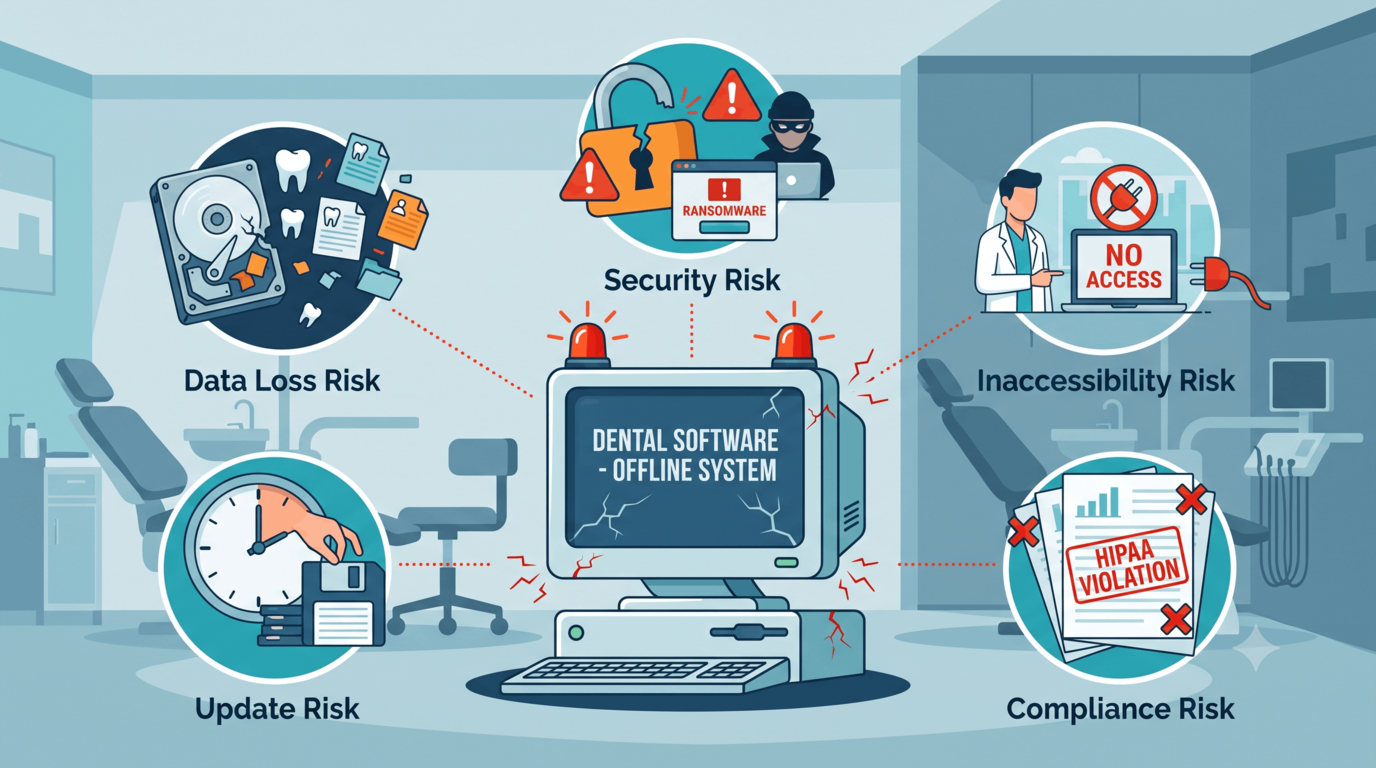
Offline dental software often feels safe because it is physically close. The server is in the clinic. The data is "with us". The team knows the old screens. Nothing depends on the internet.
That feeling is understandable.
It is also incomplete.
The bad side of offline software usually appears slowly, then suddenly. Slowly as reports take longer, backups become someone's memory, remote access needs workarounds and branches drift apart. Suddenly when a server fails, a backup does not restore, or the only workstation that prints correctly stops working on a busy morning.
The problem is not that offline software never works. The problem is that it makes the clinic responsible for risks most owners did not open a dental practice to manage.
Local hardware becomes a clinical dependency
If an offline system depends on one server, that server becomes part of patient care.
When it slows down, the front desk slows down. When it fails, the schedule, chart, invoices and records may become unavailable. When the local network drops, people start writing things on paper and promising to enter them later.
That "later" is where errors begin:
- Appointments are missed or duplicated.
- Payments are posted from handwritten notes.
- Clinical notes are finished after memory fades.
- Insurance details are checked later instead of before treatment.
- Reports no longer match what happened during the outage.
The clinic may recover from the technical failure and still spend days cleaning the operational mess.
Backups are only useful if they restore
Offline systems make backups feel visible. There may be an external drive, a local backup folder or a nightly script. That visibility can create false confidence.
The useful question is not "do we have backups?" It is:
- When was the last successful backup?
- Who checked it?
- Has it been restored in a test?
- How long would recovery take?
- Would attachments, images and documents come back too?
- What data would be lost between the last backup and the failure?
Many clinics only ask those questions after a failure. By then the answer is expensive.
Backup is not a file. Backup is a recovery process.
Updates compete with the clinic day
Offline systems often require updates to be planned around the clinic. The server must be updated, then workstations, sometimes printers, devices or integrations. Someone needs administrator access. Someone needs to test everything.
Because updates are disruptive, teams postpone them.
Postponed updates create three problems:
- Security patches arrive late.
- New features are not adopted.
- Support becomes harder because each machine may behave differently.
The clinic then runs a strange mix of old habits and half-updated tools. Nobody designed that workflow. It accumulated.
Remote access becomes a workaround
Offline software is built around being in the clinic. But modern clinic management is not always in the clinic.
Owners review numbers after hours. Managers support more than one branch. Billing may work centrally. Doctors may want to check tomorrow's cases from home. None of that is unusual anymore.
With offline systems, remote access often means extra tools: VPN, remote desktop, copied exports, screenshots, messages and files sent back and forth.
Each workaround adds risk:
- Someone sees old data.
- A file is sent outside the normal record.
- A password is shared informally.
- A report is rebuilt manually.
- A decision waits until someone is physically near the server.
The work still gets done, but the clinic loses control of how it gets done.
Branches become data islands
The bad side of offline software becomes much more obvious with multiple branches.
Each location starts with the same intention. Then reality drifts:
- Procedure names differ.
- Appointment durations change.
- Price lists split.
- Stock items are named differently.
- Patient records are duplicated.
- Insurance follow-up depends on local habits.
- Reports are exported at different times.
The owner asks for a group report and receives several versions of the truth.
This is not only inconvenient. It makes management less fair. You cannot compare branches honestly if each branch defines the work differently.
Reporting arrives too late
Offline software can produce reports, but the problem is timing and consolidation.
If the manager has to wait for exports, merge files, clean names and ask follow-up questions, the report becomes a history lesson. It may explain what went wrong last month, but it rarely helps fix tomorrow.
Live operations need live signals:
- Which chair time is unsold today?
- Which claims are ageing now?
- Which patients have balances before they arrive?
- Which lab cases are late?
- Which branch is cancelling more appointments this week?
When offline reporting cannot answer quickly, teams fall back to instinct. Some instincts are good. A clinic should not have to run on them because the data is trapped.
Security is a process, not a location
"Our data is safer because it is inside the clinic" sounds reasonable, but location alone is not security.
Security depends on:
- Updated software.
- Strong user permissions.
- Protected devices.
- Tested backups.
- Access logs.
- Recovery planning.
- Staff habits.
- Clear rules for exports and remote access.
An offline server that is rarely patched, broadly accessible and backed up to an untested drive is not automatically safer than a managed cloud system. It is simply closer.
Local control can be valuable, but only when someone is actively controlling the right things.
How PDental avoids these offline problems
PDental is cloud-based, so clinics do not have to run the core system from a local server. The team works from one connected platform across scheduling, patient records, billing, payments, insurance, inventory, lab orders, CRM, attendance, messaging and reporting.
That reduces the usual offline failure points: one workstation holding the truth, branch databases drifting apart, delayed reports, manual exports and update projects that interrupt the clinic day.
PDental also supports branch-level permissions and shared patient records, which matters when a patient visits more than one location or a manager needs a group-level view. The point is not only that the system is online. The point is that the clinic's workflow stays connected.
Where to start
Audit the offline risks you already live with:
- What happens if the server fails tomorrow morning?
- Who tested the last restore?
- How many exports are used for management reports?
- How does the owner access live numbers outside the clinic?
- What happens when a patient visits another branch?
- Which updates have been postponed because they are inconvenient?
If the answers depend on one person, one machine or one spreadsheet, the software is carrying more risk than it appears. Offline can feel comfortable right up until the day comfort becomes downtime.
Frequently asked questions
What is the biggest disadvantage of offline dental software?
The biggest disadvantage is dependence on local infrastructure. If the server, workstation, backup drive or local network fails, the clinic may lose access to scheduling, records, billing and reporting at the exact moment it needs them.
Is offline software more secure because it is inside the clinic?
Not automatically. Local control can help only if backups, updates, device security, user permissions and recovery testing are handled consistently. A neglected local server can be less secure than a well-managed cloud platform.
Why does offline software make multi-branch management harder?
Each branch tends to become its own data island. Patient records, reports, stock, insurance follow-up and price lists drift apart, and management must rely on exports or manual consolidation to understand the group.
Should every clinic move away from offline software immediately?
Not necessarily. A stable single-location clinic with strong IT support may continue safely for a while. The risk rises when the clinic needs remote access, multiple branches, live reporting, automated patient communication or reliable disaster recovery.